Form Saver

Never lose what you type again.

Form Saver quietly keeps a copy of what you write in web forms and text boxes. Closed the tab, the browser crashed, or your session expired? Open Form Saver and restore it in one click.

Drafts never leave your device. No account, no cloud, no tracking.

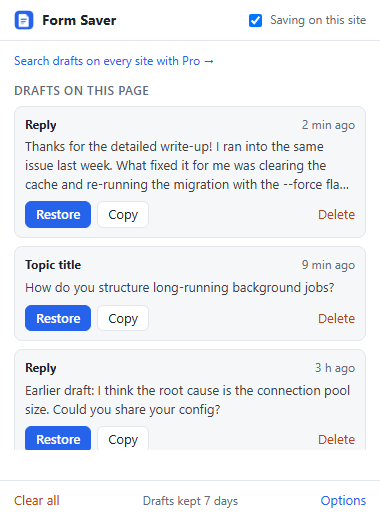
The Form Saver popup showing three saved drafts for the current page, each with Restore, Copy and Delete buttons.

How it works

1. Just typeForm Saver saves text boxes, comment fields and editors a moment after you stop typing. There's nothing to set up.
2. Something goes wrongThe tab closes, the page reloads, or the site logs you out halfway through a long post.
3. Restore itClick the Form Saver icon on that page and press Restore. If the field is gone, copy the text instead.

Never saved: password fields, credit card fields, fields a site marks as private (autocomplete="off"), and fields whose names suggest card numbers, CVVs, social security numbers or passwords. You can also pause Form Saver on any site.

Free, with an optional one-time upgrade

Free

$0
  • Automatic backup of text fields on every site
  • Restore, copy or delete drafts for the current page
  • Drafts kept for 7 days
  • Pause on any site, clear everything in one click
Add to Chrome

Pro

$9 one-time, lifetime
  • Everything in Free
  • Search every saved draft across all sites
  • Keep drafts for 30 or 90 days, or forever
  • Export all drafts to a Markdown file
Buy Pro for $9

Paid securely through Stripe. Not a subscription. You get a license key right after checkout.

Questions

Where are my drafts stored?

Only in your browser's local extension storage on this computer. Form Saver has no servers that receive your drafts, and there is no sync. Uninstalling the extension deletes them.

Why does it ask to "read and change data on all websites"?

To back up a text box, Form Saver has to run on the page that contains it, and that could be any site. It only reads the text fields you type into, and it only writes to a field when you press Restore.

Does it save passwords or card numbers?

No. Password fields, payment fields and fields a site marks as private are skipped, and so are fields whose name suggests a card number, CVV, social security number or password.

Does it work in rich editors and comment widgets?

It works in plain text boxes, text inputs, and editable areas (contenteditable), including ones inside embedded frames. Restored text goes back in as plain text.

How long are drafts kept?

Seven days on the free version. With Pro you choose 7, 30 or 90 days, or forever. You can delete any draft, or all of them, at any time.

I lost my license key.

Email Roarksend.Support@gmail.com from the address you used at checkout and we'll send it again.